← Back to CAIT Metis Logo

METIS

Project Management Simulation Software

A hands-on simulator for teaching project management. Students receive a project scenario, plan it, and then execute it period by period while Metis injects uncertainty. They react in real time and are assessed on time, cost, cash flow and delivered benefit. Play alone, or as a team over the network: shared tasks, parallel projects competing for the same staff, or a tournament.

For academic use · Runs fully offline · Windows 10/11 desktop app or any modern browser · Demo sessions on request

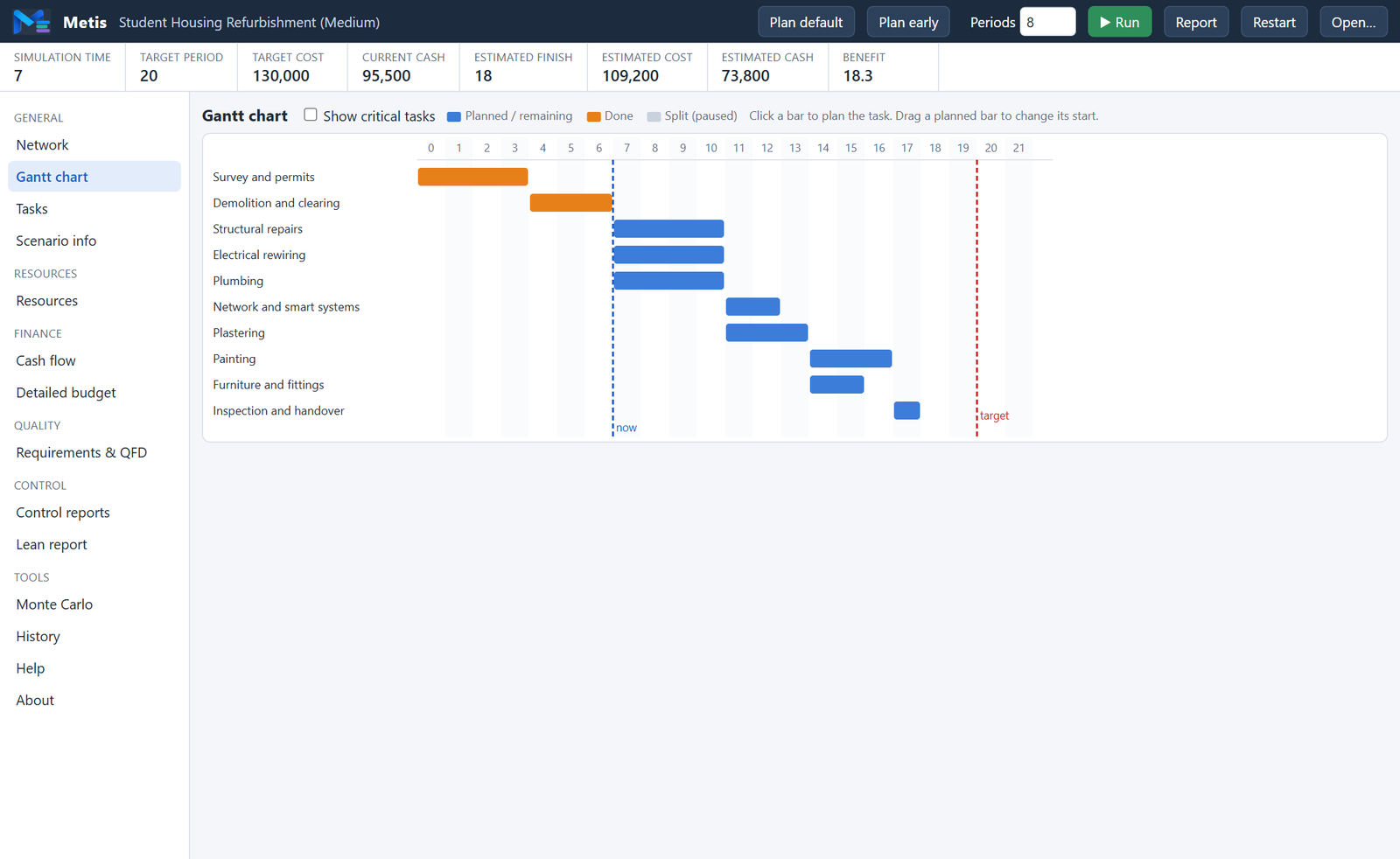
Metis Gantt chart during execution of the Student Housing Refurbishment scenario

The Name

Metis is the Titaness of wisdom, prudence and deep counsel in Greek mythology. Her name means practical, cunning intelligence: the ability to plan ahead, weigh options and find the clever way through a difficult situation. Daughter of Oceanus and Tethys and first wife of Zeus, she devised the plan that freed Zeus’s siblings from Cronus and secured his victory. Later swallowed by Zeus, her wisdom lived on within him and gave birth to Athena, goddess of strategy. Metis therefore stands for foresight, resourceful planning and sound judgement under uncertainty, the very qualities a project manager must develop.

3 Phases: Plan · Execute · Control
15 Analysis Views & Reports
4 Assessment Criteria
JSON Open Scenario Format

How a Session Works

The student is the project manager. Every decision has a cost, a lead time, and a consequence.

STEP 01

Understand & Plan

Read the briefing: tasks, precedence network, due date, target cost, cash and system requirements. Then plan every task:

  • Choose an execution mode (duration, cost, resources, quality)
  • Set start periods or drag bars in the Gantt chart
  • Check resource loads, cash position and requirement scores
STEP 02

Execute Under Uncertainty

Run the clock period by period. Metis draws actual task durations from triangular estimates and rolls attendance for every worker. The run stops when the manager must act:

  • An unplanned task becomes ready
  • Workers did not show up — resource shortage
  • Cash is about to go negative
STEP 03

React & Control

Re-time tasks, change modes, split a running task, assign or release resource units. Then compare baseline against reality:

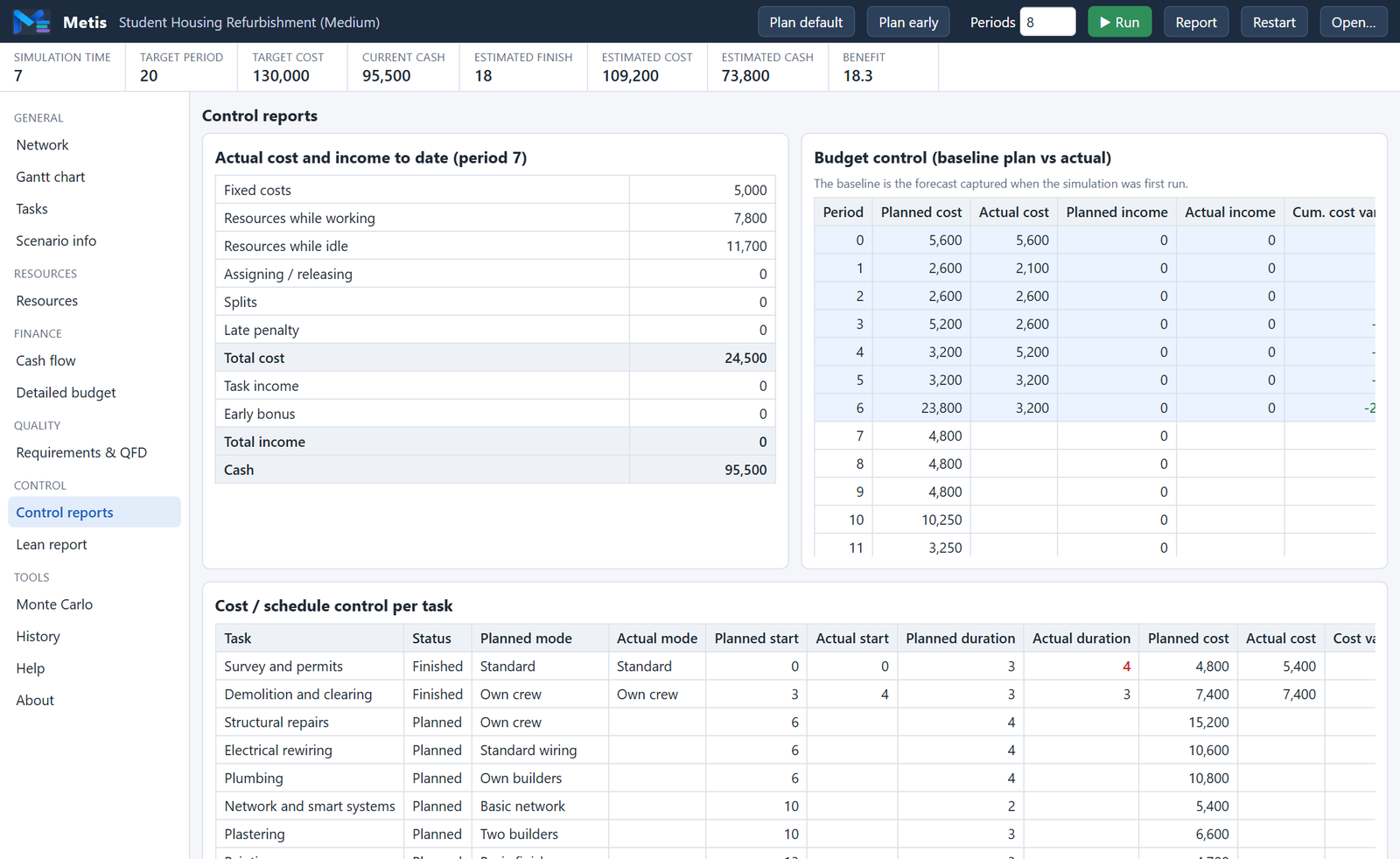
  • Budget control and cost/schedule control reports
  • Lean report: value, waste and constraints
  • Monte Carlo risk analysis of the remaining plan

Key Features

Everything a project management laboratory course needs, in one self-contained application.

🗺

Network, Gantt & Task Table

Interactive precedence network, drag-to-reschedule Gantt chart with critical-task highlighting, and a full task table. Click any task to open its planning panel.

🎯

Multi-Mode Tasks

Each task offers alternative modes with triangular duration estimates (optimistic, most likely, pessimistic), fixed costs, resource needs and quality parameter values.

👷

Realistic Resources

Resource types with working and idle cost, show-up probability, assign/release cost and lead time, and min/max unit limits. Idle staff cost money every period.

🎲

Stochastic Execution

Random durations and unreliable attendance make every run different. Deterministic scenarios are supported for a first introduction to the tool.

✂

Task Splitting & Re-Planning

Pause started tasks, delay or re-mode unstarted ones, assign units for future periods. Every reaction is logged in the event history.

💰

Cash Flow & Budget

Cumulative cash and net change per period, milestone payments, early-finish bonus and late-finish penalty. Detailed budget with actual vs. forecast periods.

📊

Control Reports

Baseline plan captured at the first run. Budget control and cost/schedule control per period and per task, with variances highlighted.

✅

Requirements & QFD

Systems-engineering requirements defined by formulas over quality parameters, importance weights, minimum/desired/maximum values, benefit score and a QFD matrix showing which task drives which requirement.

♻

Lean Report

Value delivered (benefit) against waste (idle resources, penalties, splits) and a clear pass/fail on the time, cost and cash-flow constraints.

🎰

Monte Carlo Risk Analysis

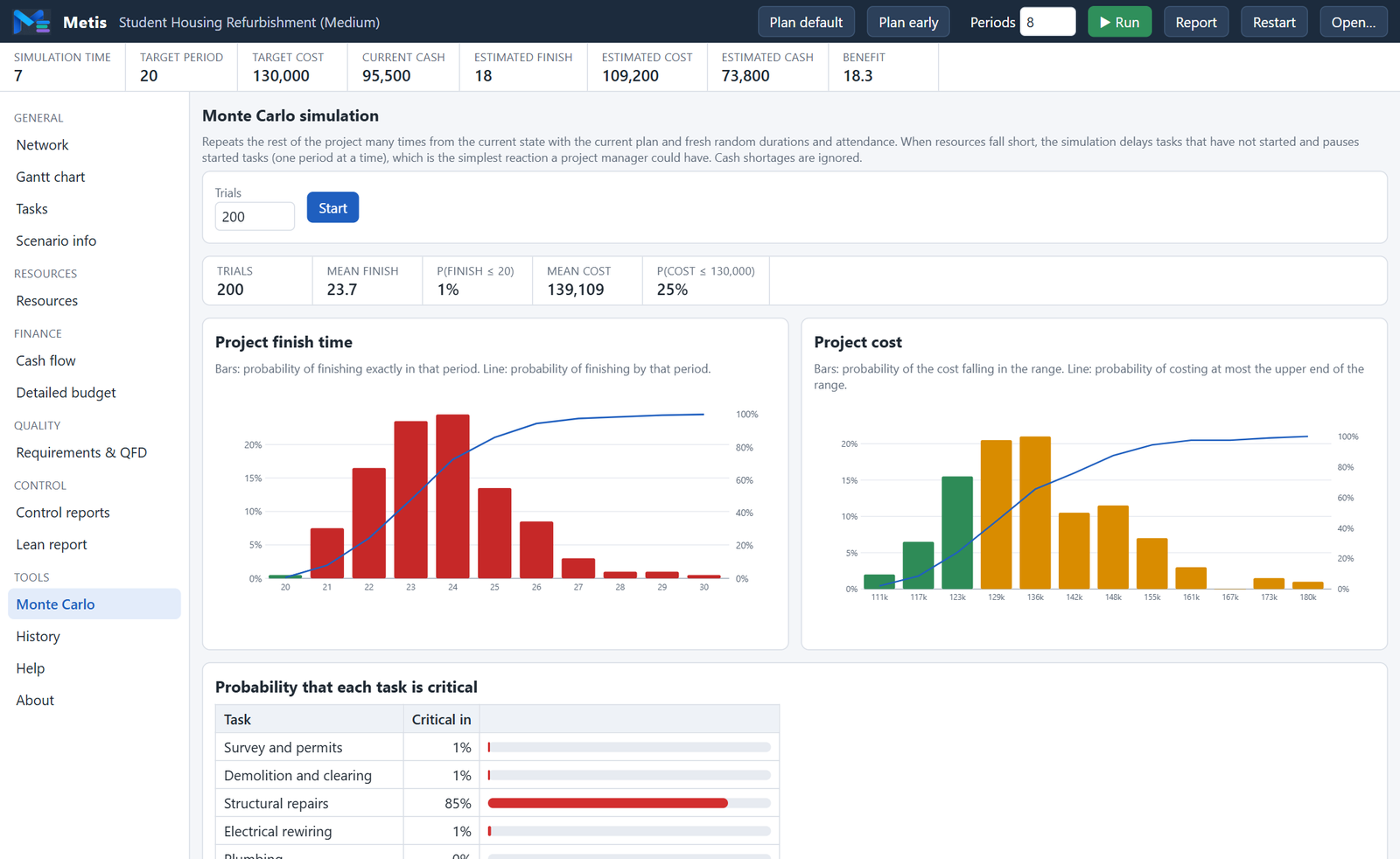
Hundreds of automatic runs from the current state: distributions of finish time and cost, probability of meeting targets, and criticality probability of each task.

⏪

History with Limits

Automatic and manual snapshots with peek and load. Instructors set per-scenario limits on saves, loads and peeks to keep the exercise honest.

👥

Multi-user Sessions

Several students on different computers in one session: shared tasks on the same project, parallel projects drawing from one personnel pool and one budget with deliverables between them, or a tournament with a live leaderboard.

⚡

Scripted Events

Instructors script the risks of the project: a supplier delay, a key engineer resigning, a change request, a regulator asking for more tests. When an event fires the clock stops and the student must choose between responses with real trade-offs in time, money and capacity. Decisions are logged and graded.

📈

Earned Value & Efficient Frontier

PV, EV and AC with S-curves and the indices SPI, CPI, EAC, ETC, VAC and TCPI, overall and per task. The efficient frontier plots every open combination of modes as cost against benefit and marks the dominated designs; one click applies a frontier design to the plan.

💾

Save & Resume

Games are autosaved on the computer after every change and can be saved to a file, so a laboratory exercise can span two sessions or be continued at home. Planning steps can be undone and redone (Ctrl+Z / Ctrl+Y) before the clock advances.

📝

Hand-In Reports

One click opens a PDF report in a pop-up window: summary and constraints, requirements and benefit, cash-flow charts, the Gantt chart, resource charts, earned-value indices and S-curves, event decisions, task and budget-control tables and the complete event log. Students add their name and save it for submission and grading.

🛠

Scenario Builder & Bundled Scenarios

A built-in editor with a scenario tree, live validation and a network preview lets instructors create or adapt scenarios and test them at once. Five scenarios ship with Metis, three of them adapted from classic CPM, cash-flow and resource-levelling exercises, with scheduled absences, funding tranches and milestone payments.

Inside Metis

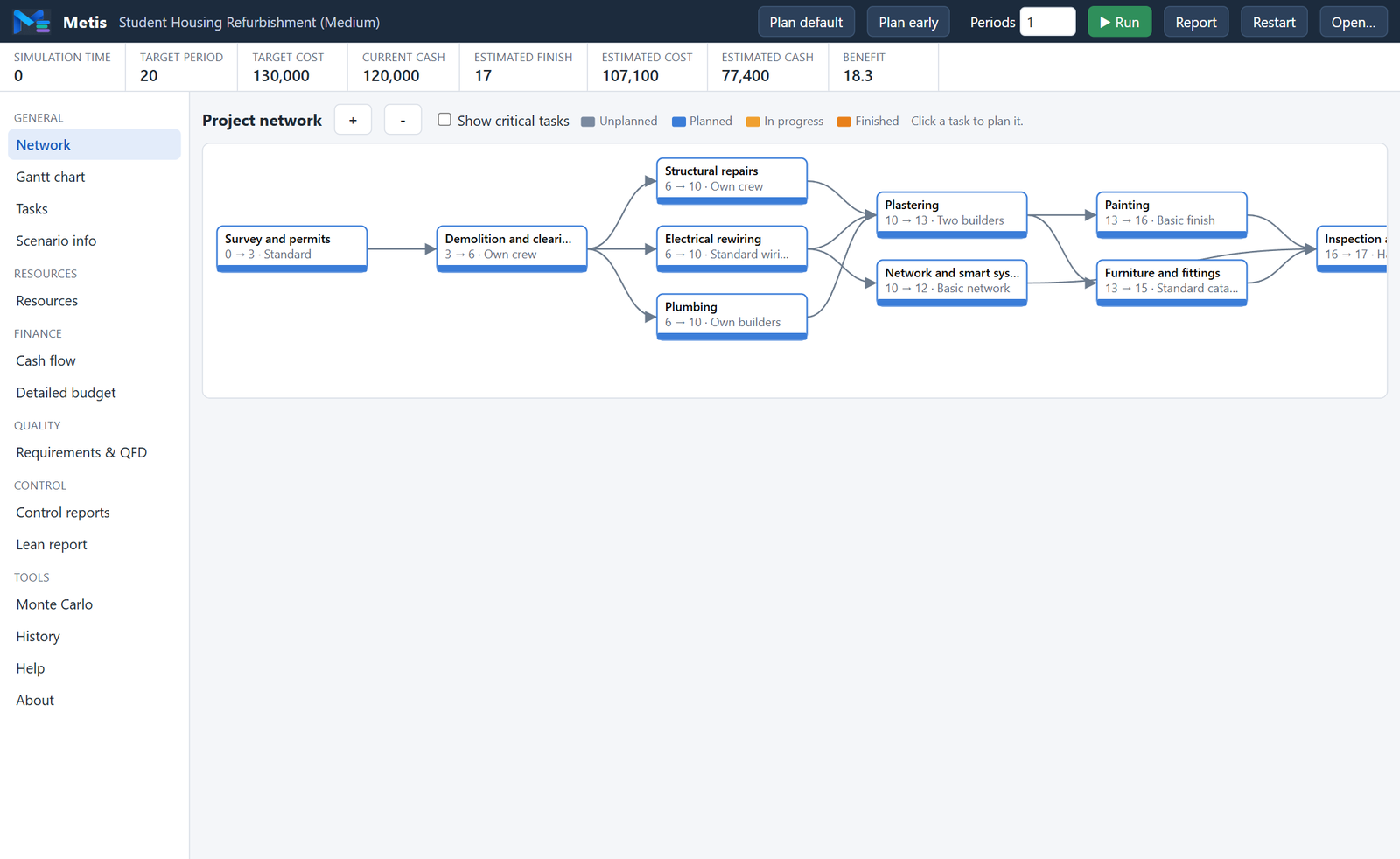
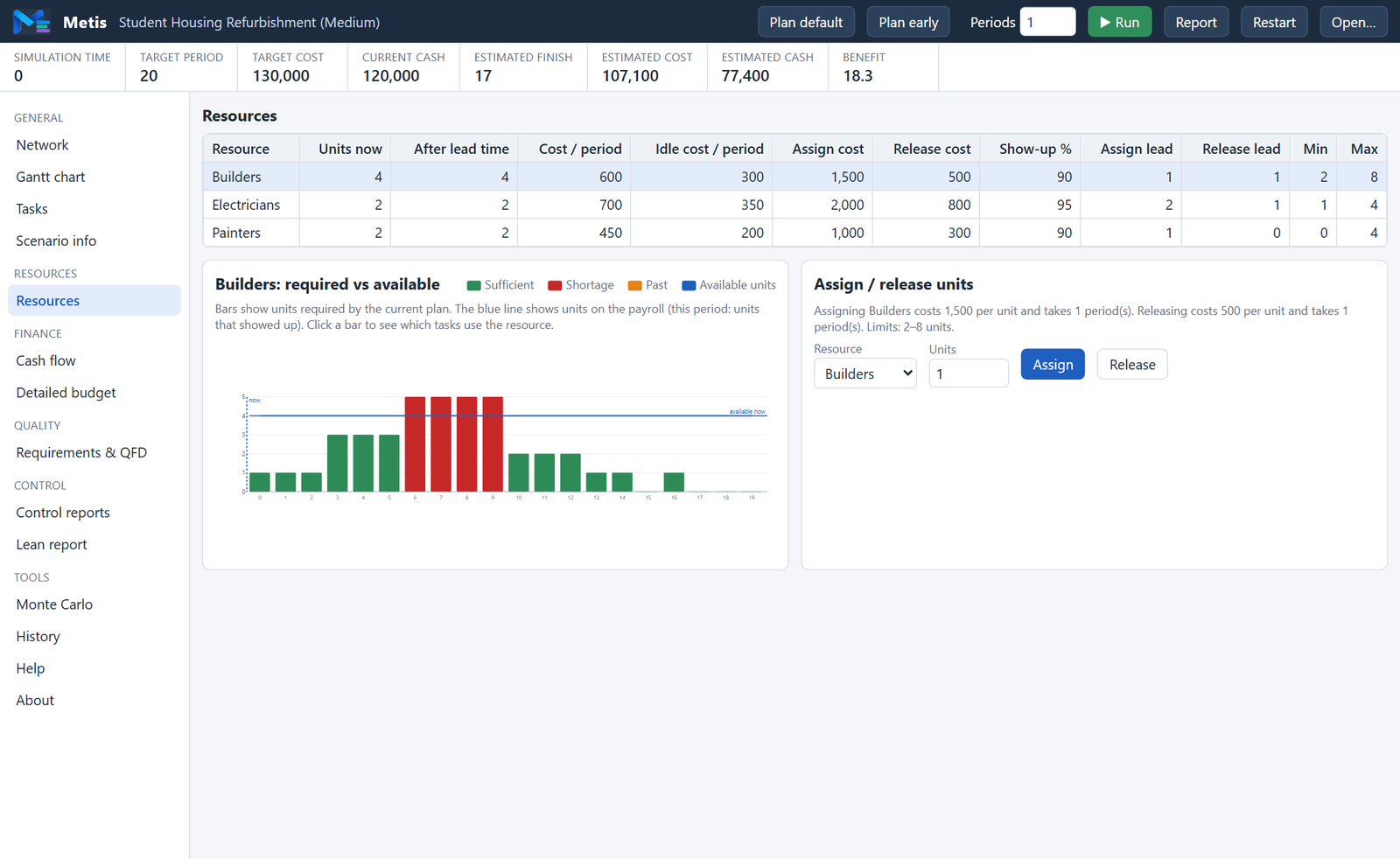
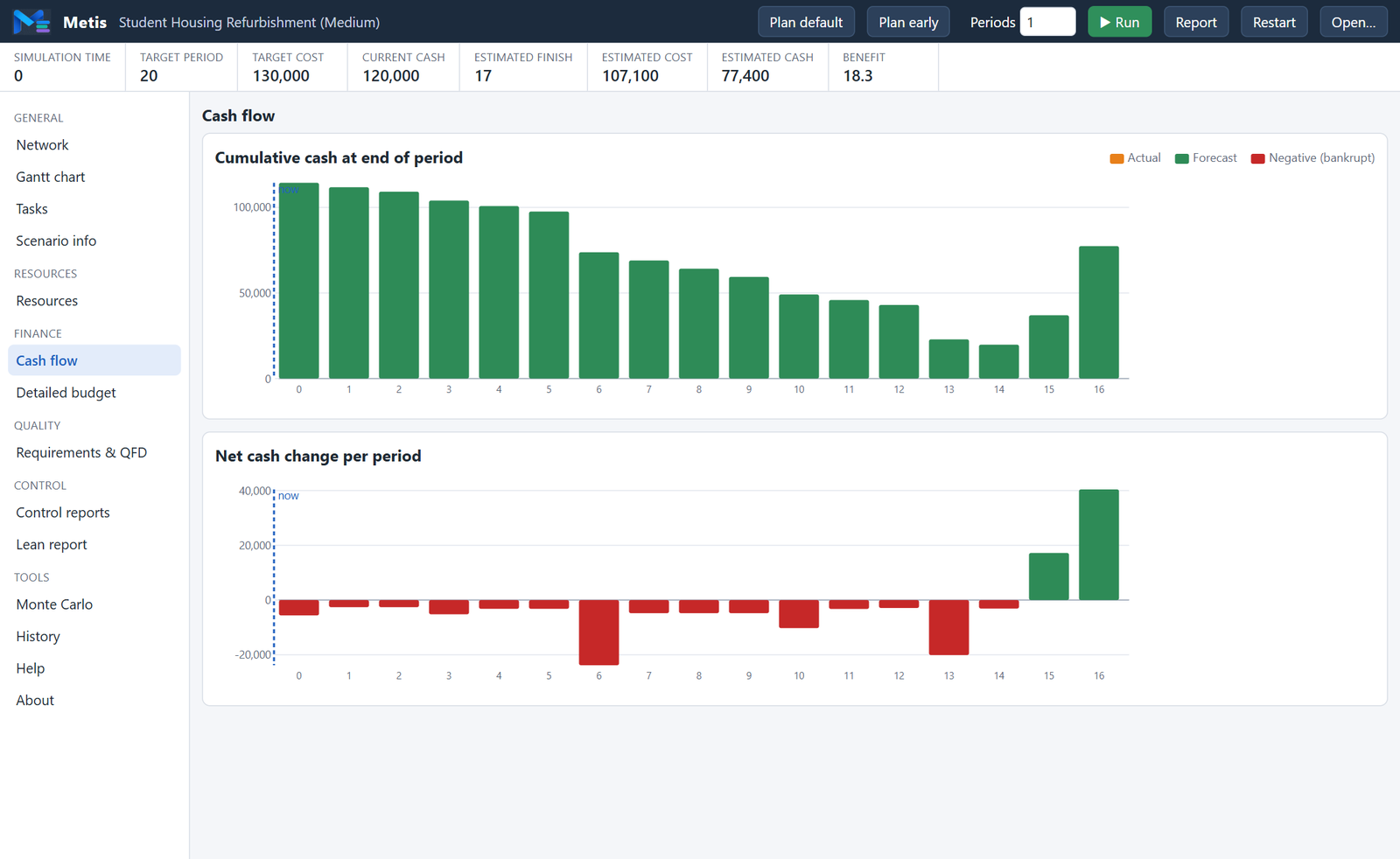
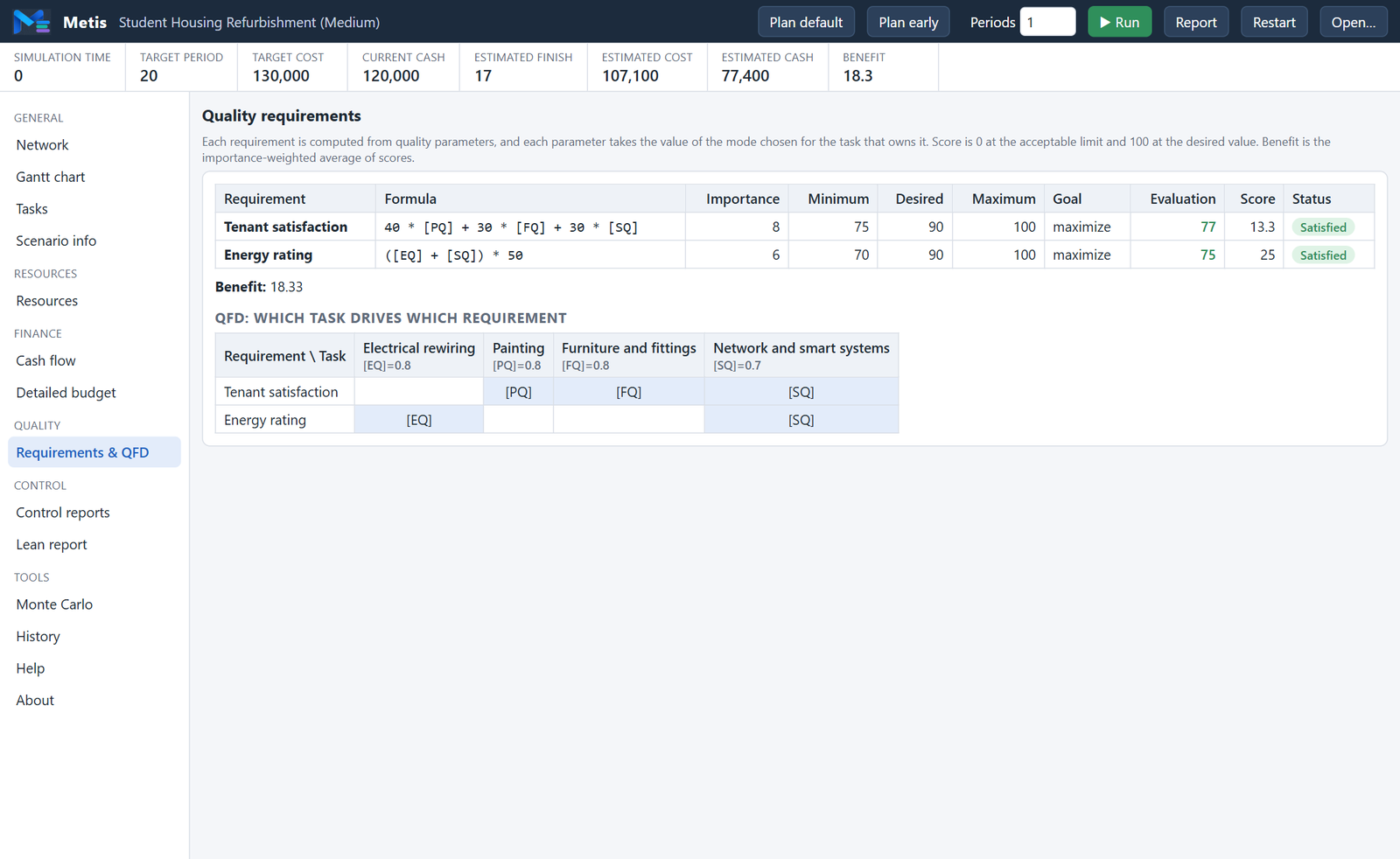
Screens from the bundled “Student Housing Refurbishment” scenario: ten tasks, three trades, uncertain durations and unreliable attendance.

Project network view
Project NetworkFinish-to-start precedence with the chosen mode and planned start/finish on every node. Colours show unplanned, planned, in-progress and finished tasks.
Resources view
ResourcesRequired versus available units per period. Red bars flag a shortage that must be resolved by re-timing, re-moding or assigning more units.
Cash flow view
Cash FlowCumulative cash and net change per period, actual and forecast. A negative position means the project is bankrupt.
Requirements and QFD view
Requirements & QFDRequirement formulas evaluated from the selected modes, importance-weighted benefit, and the QFD matrix linking tasks to requirements.
Control reports view
Control ReportsActual cost and income to date, budget control against the baseline, and cost/schedule control per task.
Monte Carlo view
Monte CarloDistribution of project finish time and cost over hundreds of trials, with the probability that each task ends up on the critical path.

Play Together: Multi-user Sessions

One computer runs the Metis session server on the local network. Students join from the desktop app or from a browser with a four-letter code. No internet connection is needed.

GAME 01

Same Project, Shared Tasks

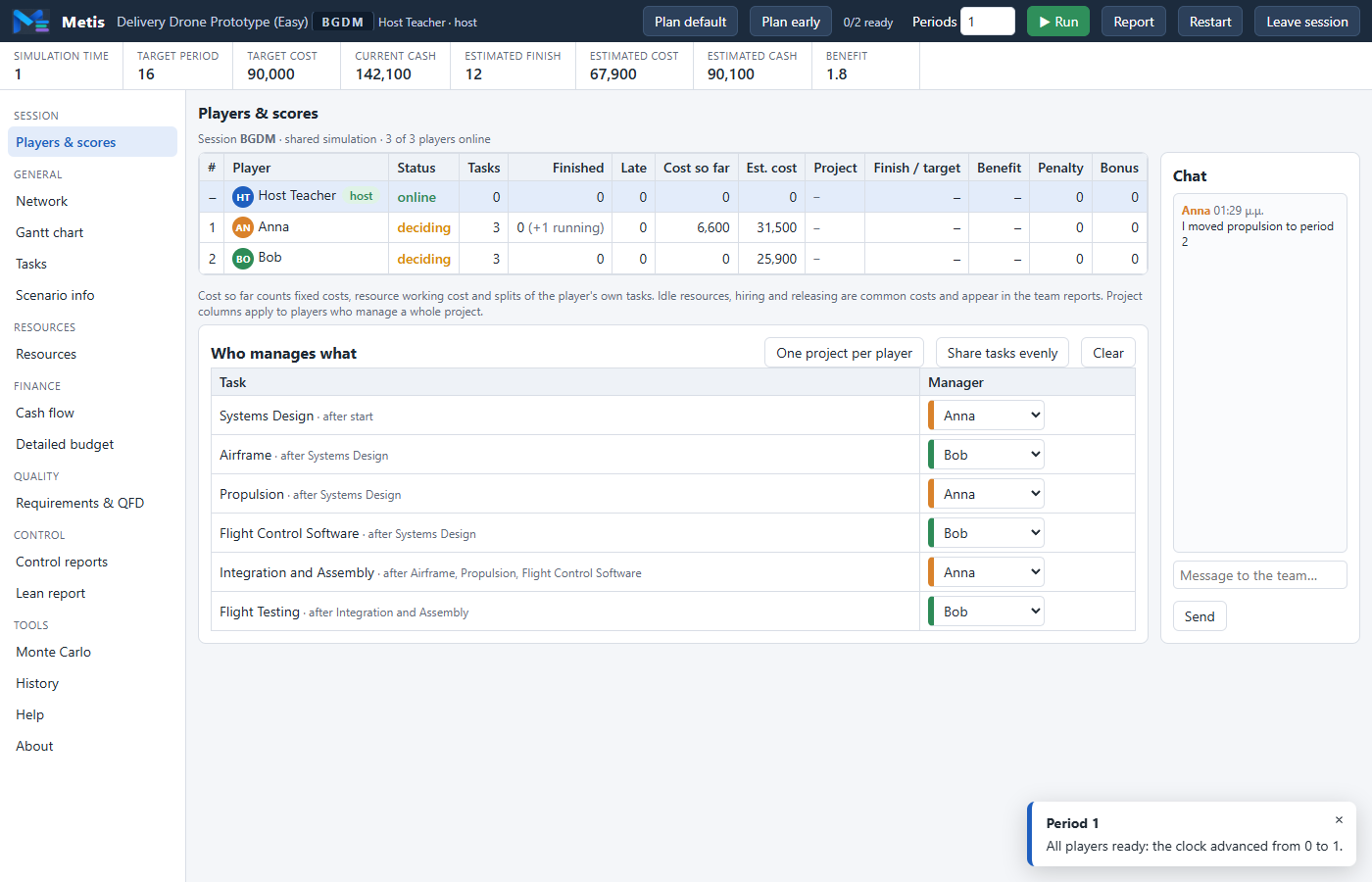
One project for the whole team. The host assigns specific tasks to each player, who plans, re-times and splits only those tasks. Personnel and cash are common, so every decision affects the others.

  • Clock advances when every player is ready, or when the host runs
  • Ownership visible in the network, Gantt chart and task table
  • Team chat and per-player scores
GAME 02

Parallel Projects

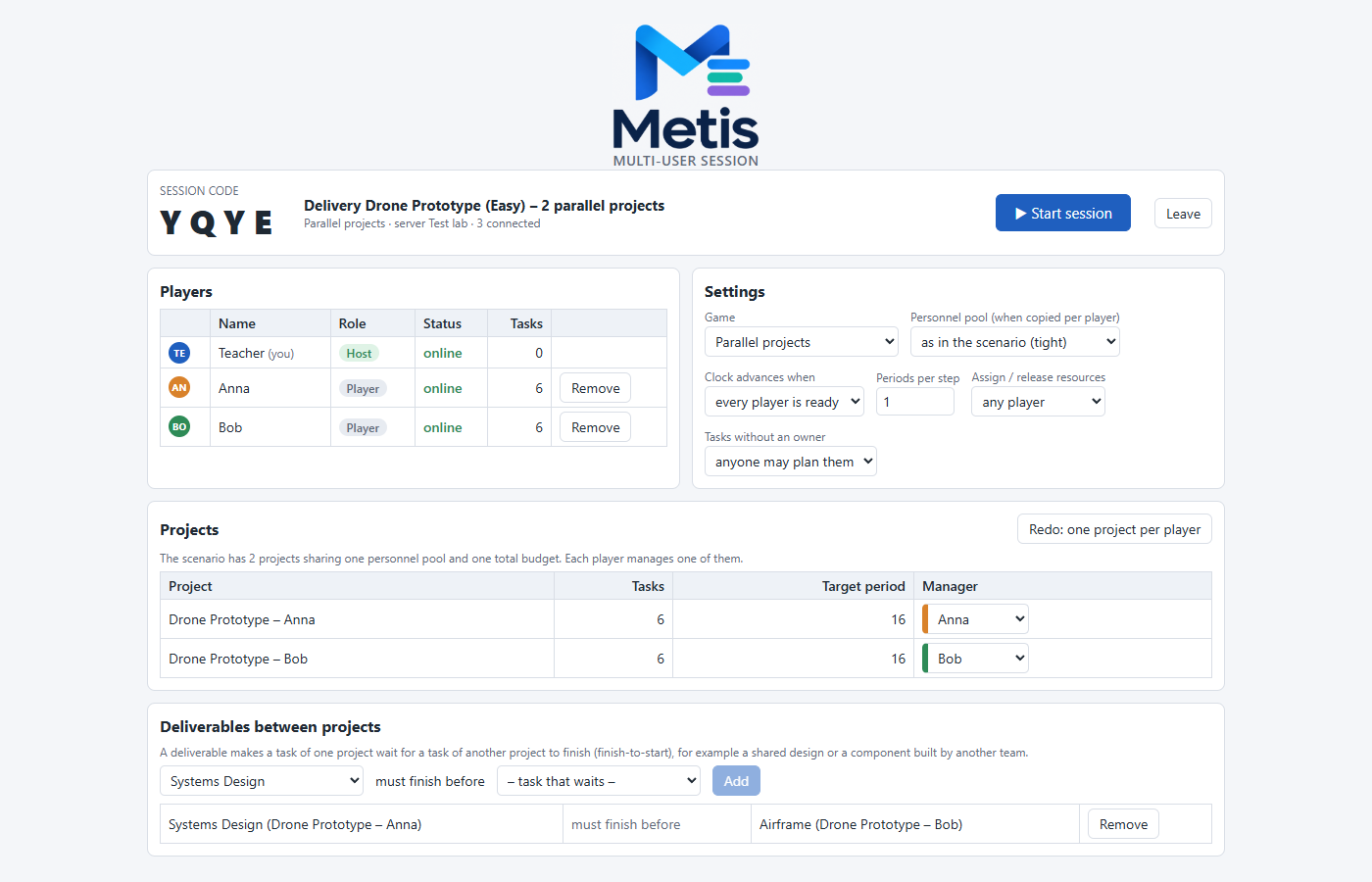
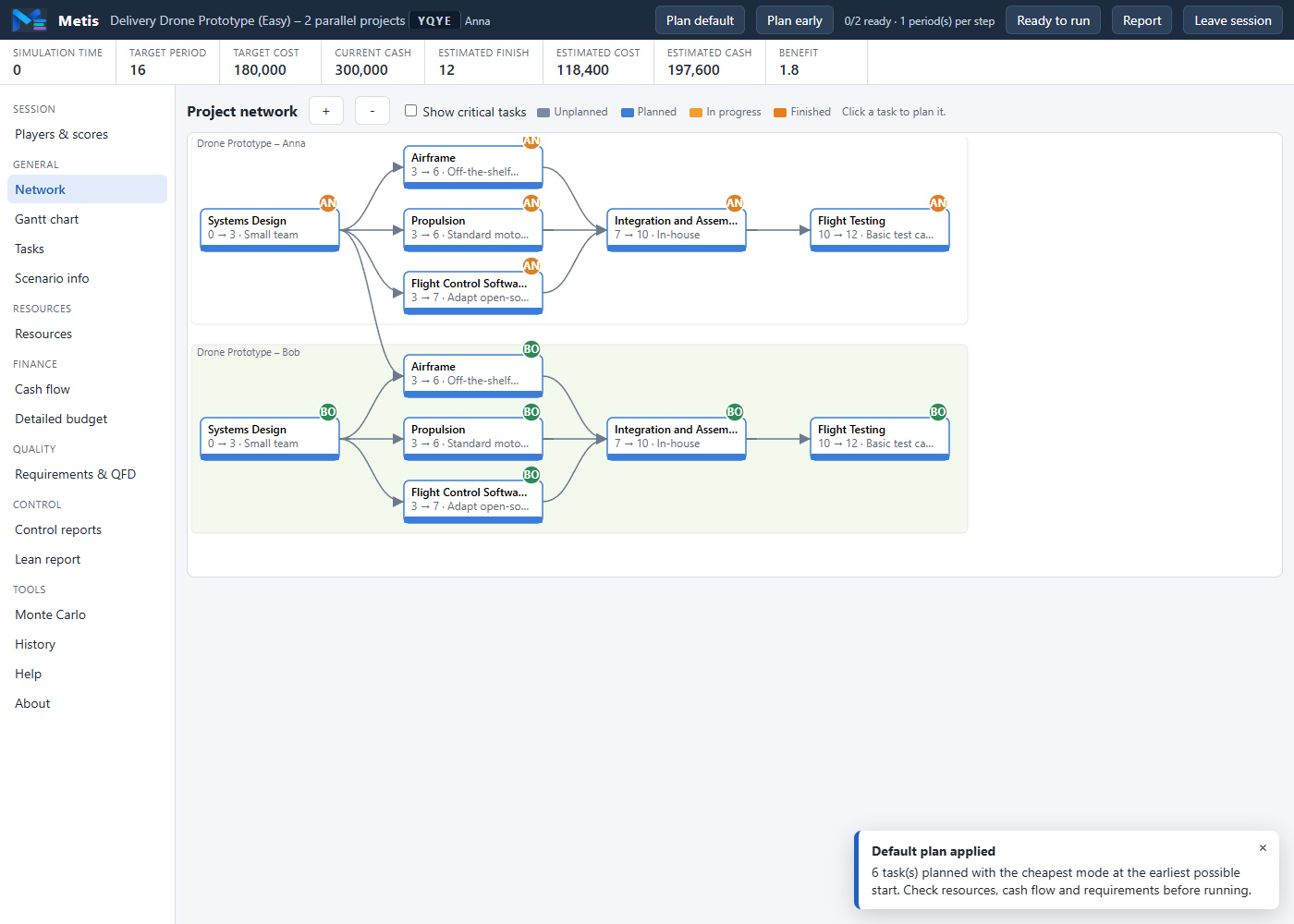
Every player runs their own project at the same time. The projects depend on each other through one pool of personnel, one total budget and deliverables defined by the instructor: a task of one project must finish before a task of another can start.

  • A single-project scenario is copied once per player
  • Adjustable size of the shared personnel pool
  • Project finish, benefit, penalty and bonus per player
GAME 03

Tournament

Everybody plays the same scenario independently with identical random outcomes: same task durations, same absences. A live leaderboard ranks the results by completion, lateness, cost and benefit.

  • Fair comparison of individual decisions
  • Suitable for graded exercises
  • Chat available throughout
Session lobby with players, settings, projects and deliverables
Session LobbyThe host sees the session code, the connected players, the rules of the game, one project per player and the deliverables between projects.
Two parallel projects with a deliverable between them
Parallel ProjectsTwo projects in one simulation, one per player. Coloured badges show who manages each task; the edge between the projects is a deliverable.
Players and scores view with chat
Players & ScoresRanking, readiness, tasks, costs, lateness and benefit per player, task assignment for the host, and the team chat.

How a Session Runs

1. The instructor starts the session server on one PC; it prints the address.
2. Students open the address in a browser or connect from the desktop app.
3. The host creates the session, chooses the game and the rules, and reads out the code.
4. Players join, the host assigns tasks or projects, and starts.
5. If a connection drops, the player reconnects and keeps their place.

For Educators

Designed for laboratory sessions in engineering, management and MBA courses.

Assessment on Four Criteria

Time — finish at or before the target period; late penalty and early bonus per period.
Cost — total cost against the target cost, including idle resources and splits.
Cash flow — the cash position must never go negative.
Benefit — importance-weighted score of the system requirements (0–100).

Write Your Own Scenarios

Use the built-in Scenario Builder or write plain JSON files. Define resource types (with scheduled absences), projects (with advances and funding tranches), tasks, modes, quality parameters and requirement formulas such as Pow([TP]*[RS]*[AG], 0.25). Set all three duration estimates equal and attendance to 100% for a deterministic exercise. Distribute scenarios through your LMS or a shared folder; students open them with “Open scenario file…”.

Scenario Element What the Instructor Controls
SettingsEnable/disable hiring and firing, task splitting, limited resources, quality requirements; history limits (saves, loads, peeks)
Resource typesInitial units, working and idle cost, show-up probability, assign/release cost and lead time, min/max units
ProjectInitial cash, target period, early-finish bonus, late-finish penalty
TasksPredecessors, income upon finish, cost of split, quality parameters, alternative modes
ModesFixed cost, optimistic / most likely / pessimistic duration, resource units, quality parameter values
RequirementsFormula over quality parameters, importance (1–10), minimum / desired / maximum value, maximize or minimize
EventsTrigger (period, task start or finish, random window), description, two or more responses, each with effects: cash, extra work, units unavailable, staff change, moved due date
🚁

Delivery Drone Prototype Easy

Deterministic six-task development project with two resource types and four system requirements. The recommended first scenario: it introduces modes, requirements and the QFD view without randomness.

🏗

Student Housing Refurbishment Medium

Ten-task construction project with uncertain durations, unreliable attendance, milestone payments, task splitting and resource assignment. Two tenant requirements to satisfy.

Request a Demo

Metis is currently used in lab-scale sessions. Contact us to arrange a demonstration for your course or institution.

What a Demo Includes

A guided walkthrough of a complete session: reading the briefing, planning the project, running it under uncertainty, reacting to shortages, and reviewing the control, lean and Monte Carlo reports. Multi-user games can be demonstrated with a group. We can also discuss custom scenarios matched to your syllabus and the history limits you want for assessed exercises.

Request a Demo →

Write to info@caitcore.com with your institution, course and approximate number of students.

Availability

Windows desktop app — Windows 10/11, about 15 MB, installs per user with no administrator rights and no network connection. Supports unattended installation for laboratory machines.

Web version — the same simulator running in a modern browser, served by the Metis session server on the classroom network, with scenario files opened locally and reports saved as PDF.

Technology

Pure TypeScript simulation engine with no UI dependencies, React interface, Tauri 2 desktop shell on the WebView2 runtime that ships with Windows. Scenarios are validated on load with clear error messages.